
We almost hid the most useful feature in Frazer
We opened Frazer to its first six hundred guitarists on 1 September. Within days they had shown us that our most useful feature was nearly impossible to find, that the guitar neck looked upside down, and that half of them left without playing a note. Here is what they told us, what we changed, and what it taught us about listening.
Read the transcript
Hi there, Jonathan here from Frazer, with a quick update on what we've been doing over the last few days based on user feedback.
One of the first things we changed: we had a tempo button, up here, where you can change the speed. We'd literally had that buried somewhere down below, and people were missing it. We've now positioned it here to make it easily accessible, and it's on all the key pages in that same position.
Something else we've done is increase the size of the chord diagrams, to make them a little easier to read. There's also this marker for the bars. At the moment it's on number one, so it's showing one bar in view. You can open it up to see more than one bar: two bars, or even up to four bars ahead. Hopefully that's useful, depending on what you need. The combination of being able to slow it down and to choose how much is visible should make it easier to control the play to suit you.
Another thing we've done is on the chord diagrams and the guitar view. We've got a standard chord diagram shown vertically, and we've got the guitar-shaped fretboard here. Effectively, the guitar fretboard is that diagram rotated ninety degrees anticlockwise, so when it's played you see this. Hopefully that all makes sense.
There's more information below, but I'll be putting together one of these posts at least once a week, talking through all the new updates we have available. So thanks to everybody who's been participating in our tester group. More coming really soon. Bye for now.
What we shipped
The beta itself. Frazer runs in a desktop browser and listens through your computer's microphone, starting with a Sound Check so it knows what your guitar sounds like in your room. Two songs are in, each a five-step pathway from first chords to full playthrough, and at every step Frazer records you and plays you back beside a professional guitarist. Frazer never gives you a score: where it can't measure something confidently, it says so rather than guessing.
What players told us
The first thing, from two players in their very first voice notes, was a question: how do I slow the song down? Full speed was too fast to learn from. The awkward part is that Frazer could already do it. A Slow, Medium and Full control had sat there since before launch, tucked into a toolbar under the very thing you were trying to play. Of everyone who recorded that week, one player had ever used it. A feature nobody can find is not a feature.
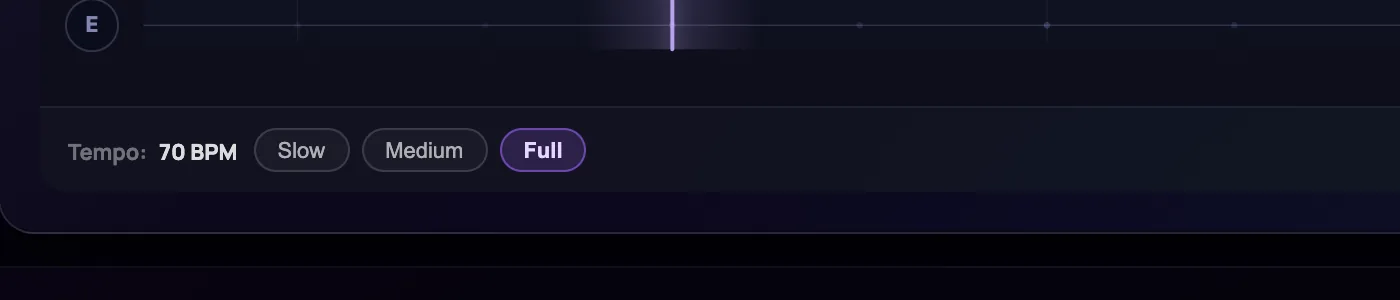
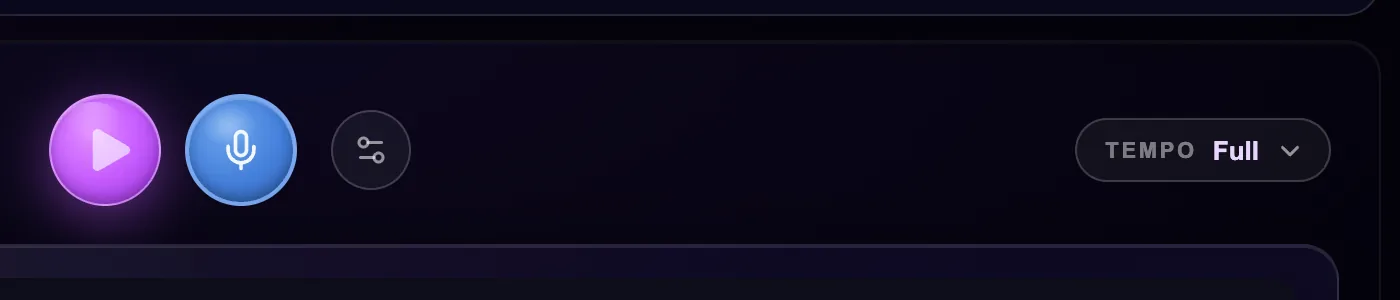
So we moved it: the tempo control now sits beside Play on every step, one button showing your speed. We fixed something we found on the way, too. Changing speed mid-song could nudge the guitar out of step with the strumming guide; now it stops the track, and you press Play to start again in time.
You can also choose how far ahead you see, from a single bar up to four, so a chord change never lands without warning.
They told us plenty more, and most of it changed the same week. Six players said the guitar neck looked upside down, and they were right: it drew the low E string along the top, where every chord book puts it at the bottom. We'd heard "upside down" once before and fixed the wrong thing; six reports together are a diagnosis, and it was flipped on Thursday. Chord names now show the sounding chord with the shape in brackets, because Frazer's names and the ones people learn online were both right and neither was enough. Chord boxes and markers are bigger and brighter, because several players told us their eyes are not what they were. And a box that used to announce "Intro complete!" whether or not you had played now claims nothing it hasn't heard.
What we learned
Hidden is the same as missing. We built the right thing and put it where we would look, not where a player looks. A fix is a claim, so here is the test: about one take in a hundred was recorded slowed down last week; if the button is now where it belongs, that should reach one in ten within a fortnight. If it doesn't, the button was never the problem, and we'll say so here.
Silence is not approval. Around half the people who signed in never pressed Record. Rather than guess why, we wrote to the ones who came once and asked a single question: what stopped you? The replies are arriving now, and they will shape next week more than any theory of ours.
What's next
- Reading the replies from the people who signed in but didn't play, and acting on them.
- Watching whether slower takes rise and the upside-down reports stop. Both are this week's fixes on trial.
- Chasing a song that wouldn't stop playing for two players. If it happens to you, press the feedback button while it's happening and tell us your browser.
- Phones and tablets, later this month.
JonathanCo-founder, Frazer